Disable access for high risk orders
Stop likely-fraudulent orders downloading before the chargeback arrives.
Last updated
Digital products are a favourite target for stolen cards: the goods are delivered instantly and there is nothing to intercept. Filemonk can check Shopify’s fraud risk on each order and block downloads automatically when the risk is high.
Before you begin
Section titled “Before you begin”- This needs a paid plan. On the Start plan the switch is greyed out, with an upgrade button beside it. See Filemonk pricing and plans.
- The risk assessment is Shopify’s, and Filemonk acts on it. Coverage depends on your Shopify plan and payment provider.
- This blocks downloads, it does not cancel or refund the order. You still decide what to do with the order itself.
- Expect occasional false positives. A genuine customer flagged as high risk will contact you, and re-enabling takes seconds.
Set it up
Section titled “Set it up”-
Click Filemonk in the left menu of your Shopify admin.
-
Click Settings in the app’s menu, then open the Orders tab.
-
In Order settings, switch on Fraud protection. The badge beside it changes from Off to On.
-
Click Save in the save bar at the top of the page.
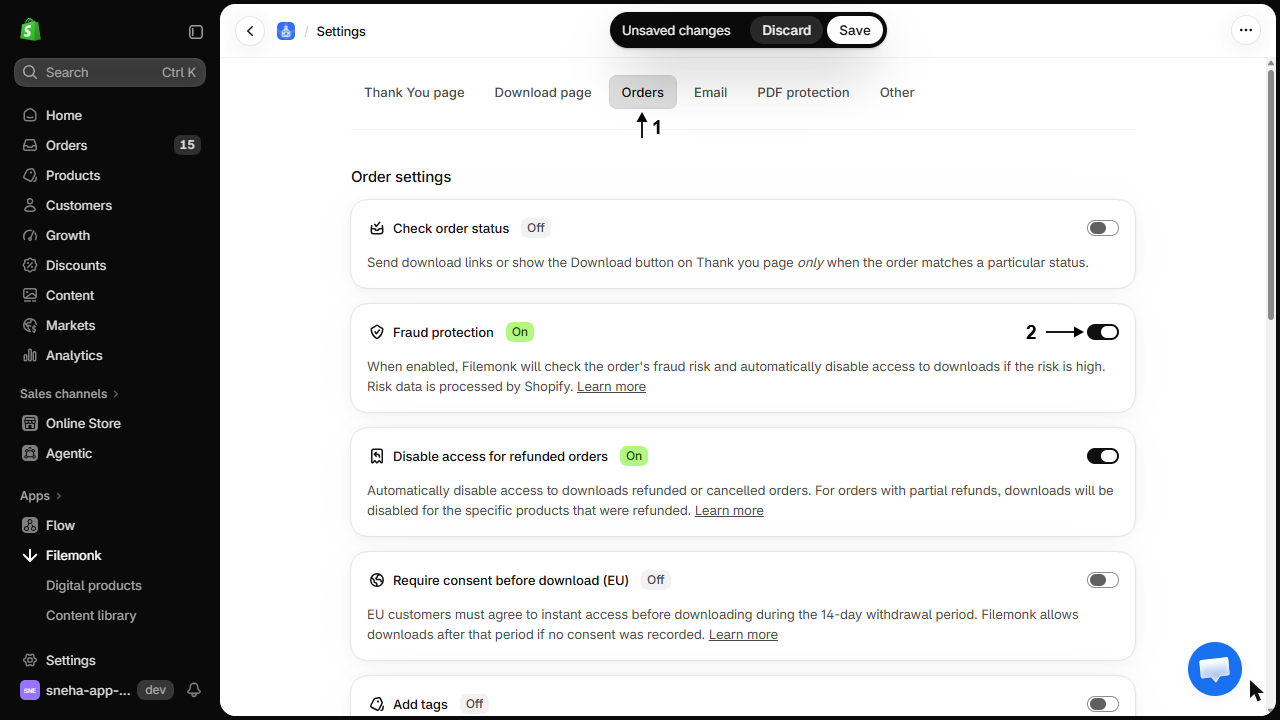
Filemonk now checks each order’s fraud risk and disables downloads where it is high. Those orders show Fraud detected in your Orders list.
What customers will see
Section titled “What customers will see”The download does not work. A genuine customer caught by this will email you, which is your cue to look at the order and re-enable it if you are satisfied.
Check your setup
Section titled “Check your setup”Watch your Orders list for the Fraud detected status over the following days. If nothing is ever flagged, that may be correct for your store, or it may mean your Shopify plan does not provide the risk data.
Troubleshooting
Section titled “Troubleshooting”A genuine customer was blocked
Open the order and re-enable access. Look at Shopify’s risk reasons too, since a repeated pattern, for example international billing, may mean this setting costs you more than it saves.
A fraudulent order got through anyway
Filemonk acts on high risk only, so medium risk orders are delivered. Disable those by hand when you spot them. See Disable access to downloads for any order.
Nothing is ever flagged
Your store may genuinely have no high risk orders, or Shopify may not be providing risk data on your plan. Check a known-suspicious order in Shopify to see whether it carries a risk level at all.
An order was flagged before the check finished
Filemonk waits for Shopify’s fraud check to complete before allowing a download, so there can be a short gap on a brand new order. It resolves itself once the check lands.
Does it cancel the order or refund the customer?
No. It only blocks downloads. Cancelling or refunding stays your decision in Shopify.
Will the customer be told why?
No. They see the download not working, which is why a genuine customer will get in touch.
Does it work retroactively?
No. It applies to orders processed after you turn it on.
Is this enough to stop card fraud?
It removes the easy win, which is the instant delivery. Pair it with watermarking so anything that does get out is traceable, and with the refund rule for chargebacks. See How Filemonk protects your files.
Related guides
Section titled “Related guides”- Disable access for refunded or cancelled orders, for what happens after a chargeback.
- Disable access to downloads for any order, for orders you judge yourself.
- Protect PDFs with a watermark, to make leaks traceable.
Thanks for letting us know.
Still stuck? Ask Quinn or chat with support