Send email and show the button based on order status
Deliver files only when an order reaches the payment or fulfilment status you require.
Last updated
By default Filemonk delivers as soon as it processes an order. If you take manual payments, review orders before dispatch, or sell high-value files, you can require a specific status first. Until the order matches, no email goes out and the Thank you page button does not appear.
Before you begin
Section titled “Before you begin”- This needs a paid plan. On the Start plan the switch is greyed out, with an upgrade button beside it. See Filemonk pricing and plans.
- This is the most common reason for “the customer got no email” when everything else looks right. Whatever rule you set here silently holds delivery back.
- The rule applies to new orders as they change status. Orders already sitting in a non-matching status are not swept up when you turn it on.
Set it up
Section titled “Set it up”-
Click Filemonk in the left menu of your Shopify admin.
-
Click Settings in the app’s menu, then open the Orders tab.
-
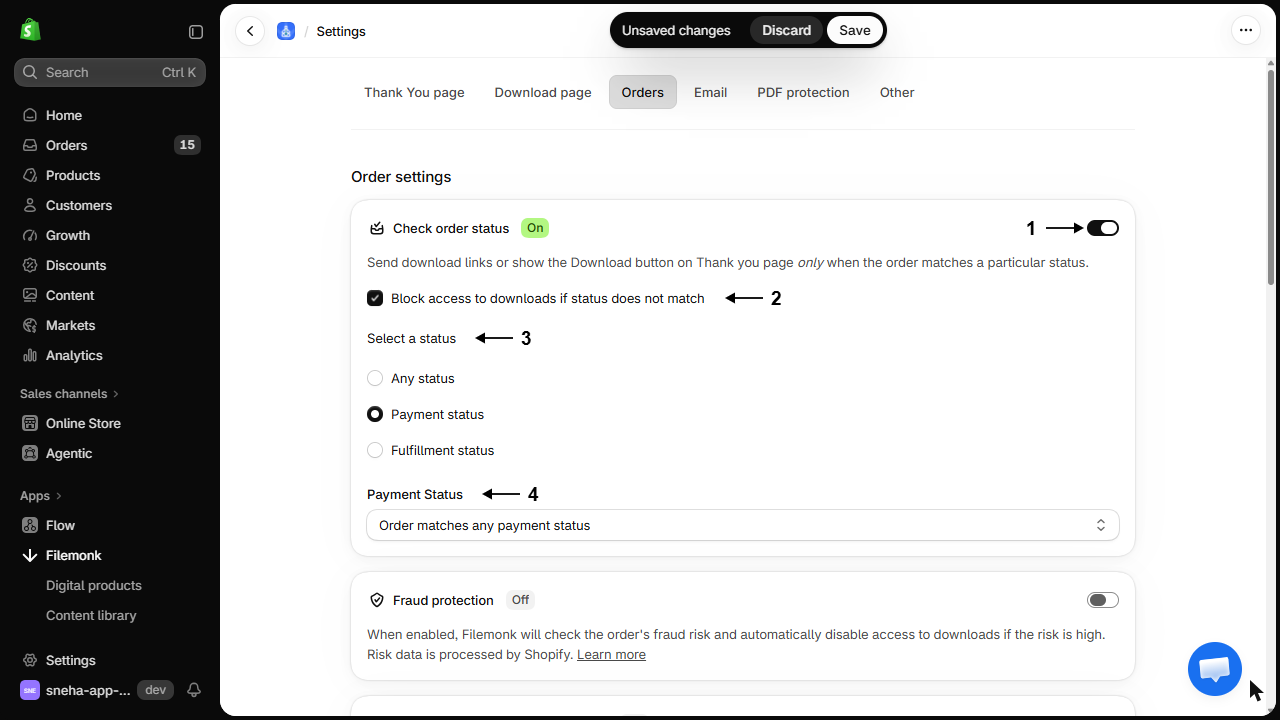
In Order settings, switch on Check order status. The badge beside it changes from Off to On, and the rest of the card appears.
-
Block access to downloads if status does not match is ticked. Leave it ticked to block the download page itself, or untick it to hold back only the email and the Thank you page button.
-
Under Select a status, choose the one kind of status to check. You set one rule, not several:
- Any status, which matches every order.
- Payment status, then pick from the Payment Status list below: Order matches any payment status, Payment is pending, Order is partially paid, or Order is fully paid.
- Fulfillment status, then pick from the Fulfillment Status list below: Order matches any fulfillment status, Order is completely fulfilled, or Only some of the items have been fulfilled.
-
Click Save in the save bar at the top of the page.
What customers will see
Section titled “What customers will see”Nothing, until the order matches. No download email and no button on the Thank you page. With the blocking option on, even a customer holding a link cannot download until the order qualifies.
Common setups
Section titled “Common setups”| You want | Set |
|---|---|
| Only paid orders get files | Payment status paid |
| Manual review before delivery | Fulfilment status fulfilled, and fulfil after reviewing |
| Nothing until you say so | Payment paid plus the blocking option, and fulfil deliberately |
If you only want to hold back unpaid orders, there is a simpler dedicated setting. See Send downloads only if the order is fully paid.
Check your setup
Section titled “Check your setup”Place a test order that does not match your rule, for example an unpaid one, and confirm no email arrives and no button appears. Then move it into the matching status and confirm delivery happens. See Create a test order.
Troubleshooting
Section titled “Troubleshooting”Customers aren't getting emails since I turned this on
Open an affected order. Filemonk names the reason directly, naming the status that did not match. Either relax the rule or move the order into the required status.
An order reached the right status but nothing was sent
The status changed after Filemonk had already dealt with the order. Send the email from the order by hand, and re-sync it if it looks out of date. See Troubleshoot a single order.
Customers see the download page but no files
The status rule is holding the files back without blocking the page. Turn on the blocking option so the page explains itself rather than looking broken.
Manual payment orders never deliver
They sit as pending until you mark them paid in Shopify. That is the intended behaviour of a paid-only rule, so either mark them paid promptly or loosen the requirement.
Partially paid orders are being delivered
Partially paid is not the same as paid. If deposits should not unlock files, require full payment. See Send downloads only if the order is fully paid.
Does this apply to the Thank you page button too?
Yes. An order that does not match gets no button, since the same rule governs both.
What is the difference between holding the email and blocking access?
Holding the email means no link is sent, but a customer with a link could still download. Blocking access stops the download itself. Use blocking when the requirement is about payment.
Can I set different rules per product?
No, the rule is store-wide.
Will orders deliver automatically once they match?
Orders that reach the required status are picked up as they change. If one slips through, send the email from the order by hand.
Related guides
Section titled “Related guides”- Send downloads only if the order is fully paid, the simpler payment-only rule.
- Troubleshoot a single order, to see why one order was held.
- Turn on order processing, if nothing is being processed at all.
Thanks for letting us know.
Still stuck? Ask Quinn or chat with support