Remove Powered by Filemonk
Take the Filemonk branding off your download emails and pages.
Last updated
Use this guide if you want to hide the small “Powered by Filemonk” mark that Filemonk adds to the emails and pages your customers see. It’s one setting, available on every plan, including Free.
Before you begin
Section titled “Before you begin”The download page editor and the email editor both control the same setting. Change it in either place and it updates everywhere.
What customers will see
Section titled “What customers will see”When the mark is turned on, customers see it:
- At the bottom of the download emails Filemonk sends, including emails about updated products.
- On the page customers see when a download is no longer available or their access has been turned off.
- On the older Filemonk-hosted download page (app.filemonk.io), if your store still uses it.
Download pages on your store and in customer accounts don’t show the mark. The preview in the download page editor still shows it until you remove it.
Set it up
Section titled “Set it up”-
Click Filemonk in the left menu of your Shopify admin.
-
Click Settings in the app’s menu, then open the Download page tab.
-
Click Customize Download page.
-
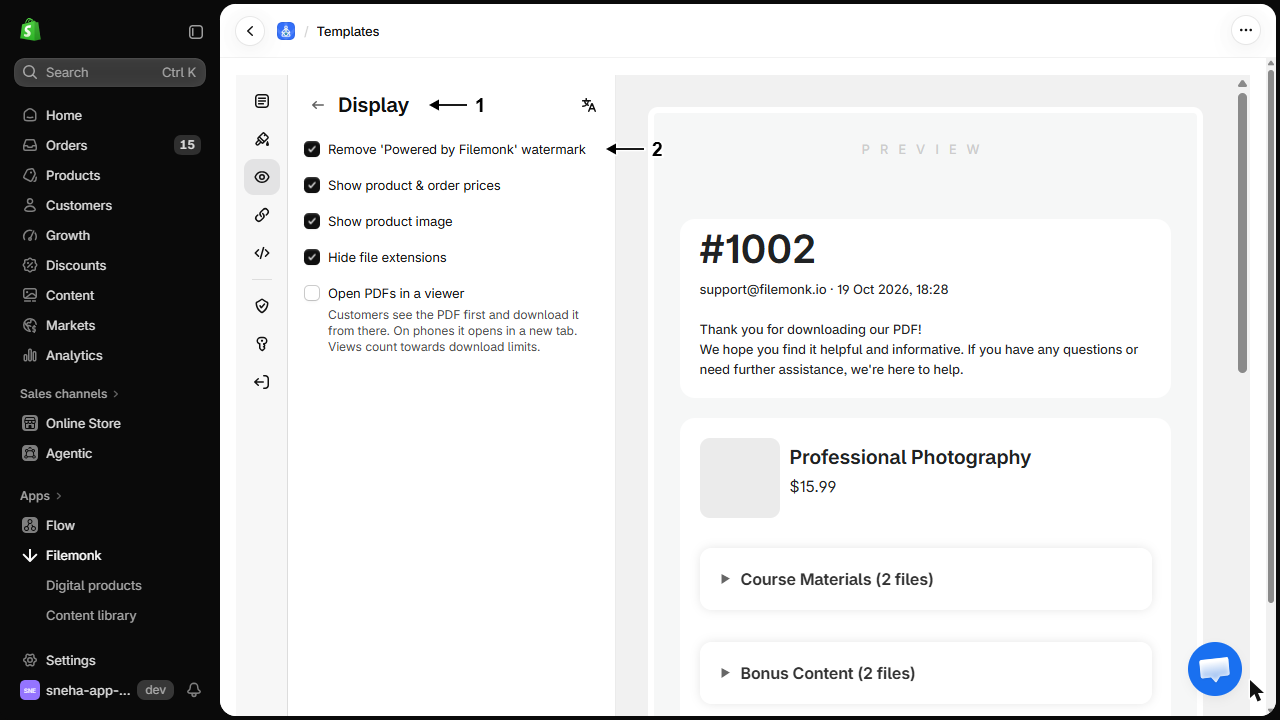
In the editor’s section list, under Page, click Display.
-
Tick Remove ‘Powered by Filemonk’ watermark. It’s the first option in the section.
-
Click Save in the save bar at the top of the editor.
If customers download from their customer account
Section titled “If customers download from their customer account”When Download files from is set to Customer Account page, the checkbox isn’t shown in the download page editor. Use the email editor instead:
-
Click Filemonk in the left menu of your Shopify admin.
-
Click Settings in the app’s menu, then open the Email tab.
-
Click Customize email.
-
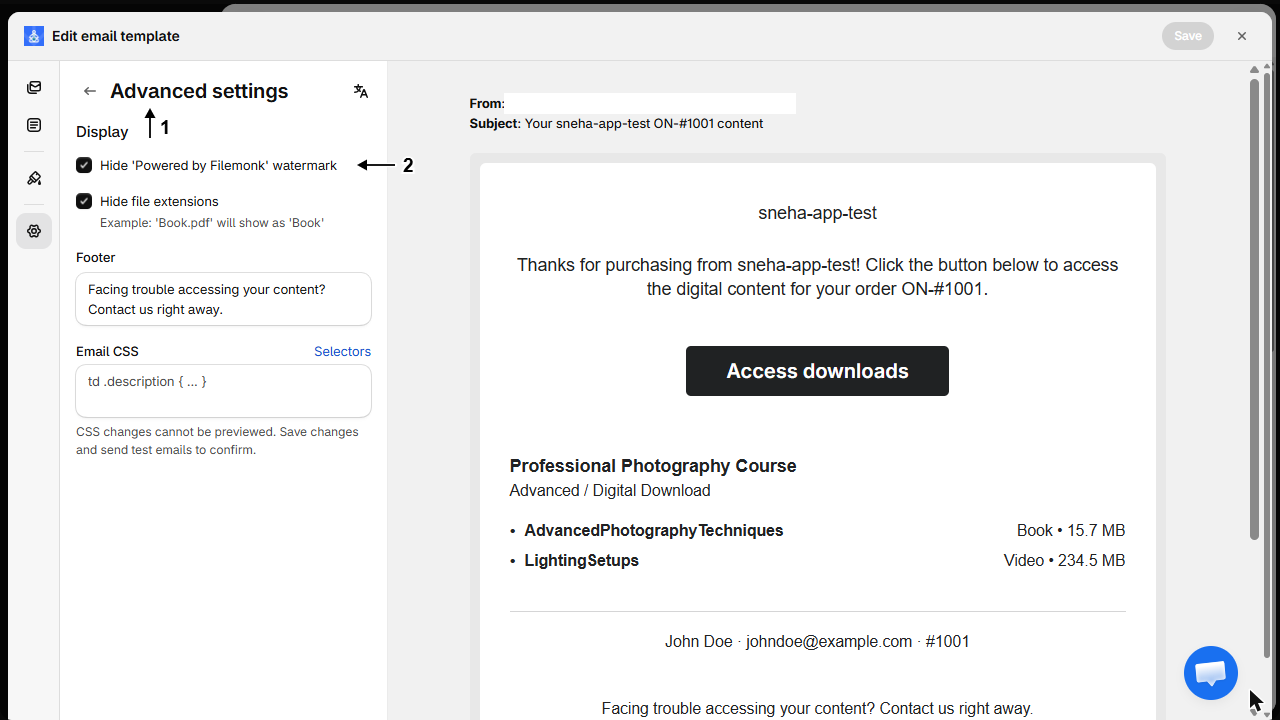
In the editor’s section list, under Advanced, click Advanced settings, then tick Hide ‘Powered by Filemonk’ watermark under Display.
-
Click Save in the save bar at the top of the editor.
Check your setup
Section titled “Check your setup”Open the Download page tab in Settings. The status under Customize Download page shows ‘Powered by Filemonk’ watermark hidden. To see it from the customer’s side, place a test order and check the download email. See Create a test order.
Troubleshooting
Section titled “Troubleshooting”The checkbox isn't in the download page editor
Customers download from the Customer Account page. Tick Hide ‘Powered by Filemonk’ watermark in the email editor instead: Settings > Email > Customize email > Advanced settings.
The mark came back after changing plans
Moving to the Start plan resets this setting. Tick the checkbox again and click Save.
The mark still shows after I ticked the box
The change wasn’t saved. Tick the checkbox again and click Save before leaving the editor.
The mark is in the editor preview but not on my live download page
Nothing to fix. The preview shows the mark until it’s turned off, and customers don’t see it on download pages on your store.
Can I remove the mark on the Start plan?
Yes. Removing the mark is available on every plan.
Do I need to change the setting for emails and the download page separately?
No. It’s a single setting. Ticking it in either the download page editor or the email editor hides the mark everywhere.
Does removing the mark change emails I've already sent?
No. It applies to emails sent after you save. Pages customers open update straight away.
Can I turn the mark back on?
Yes. Untick the checkbox in either editor and click Save.
Does it remove Filemonk from the download link too?
No, that’s separate. To serve the download page from your own domain, see Use your own branded link for downloads.
Related guides
Section titled “Related guides”- Customize the download page, where the setting lives.
- Customize the email template, for the rest of the email branding.
- Use your own branded link for downloads, to change the address too.
Thanks for letting us know.
Still stuck? Ask Quinn or chat with support