Send digital products for post purchase upsells
Deliver files a customer adds after checkout, in a post-purchase offer.
Last updated
A post-purchase upsell adds products to an order after the customer has already paid. Filemonk has normally finished with the order by then, so the added product’s files are not delivered. This setting tells Filemonk to look again when an order changes after checkout.
Before you begin
Section titled “Before you begin”Turn this on only if you actually run post-purchase upsells containing digital products. It makes Filemonk re-examine orders that change after checkout, which is unnecessary work for stores that do not.
Set it up
Section titled “Set it up”-
Click Filemonk in the left menu of your Shopify admin.
-
Click Settings in the app’s menu, then open the Orders tab.
-
Scroll to Post-purchase upsells, below Order settings, and tick Enable post-purchase digital product updates. It is a checkbox, not a switch.
-
Click Save in the save bar at the top of the page.
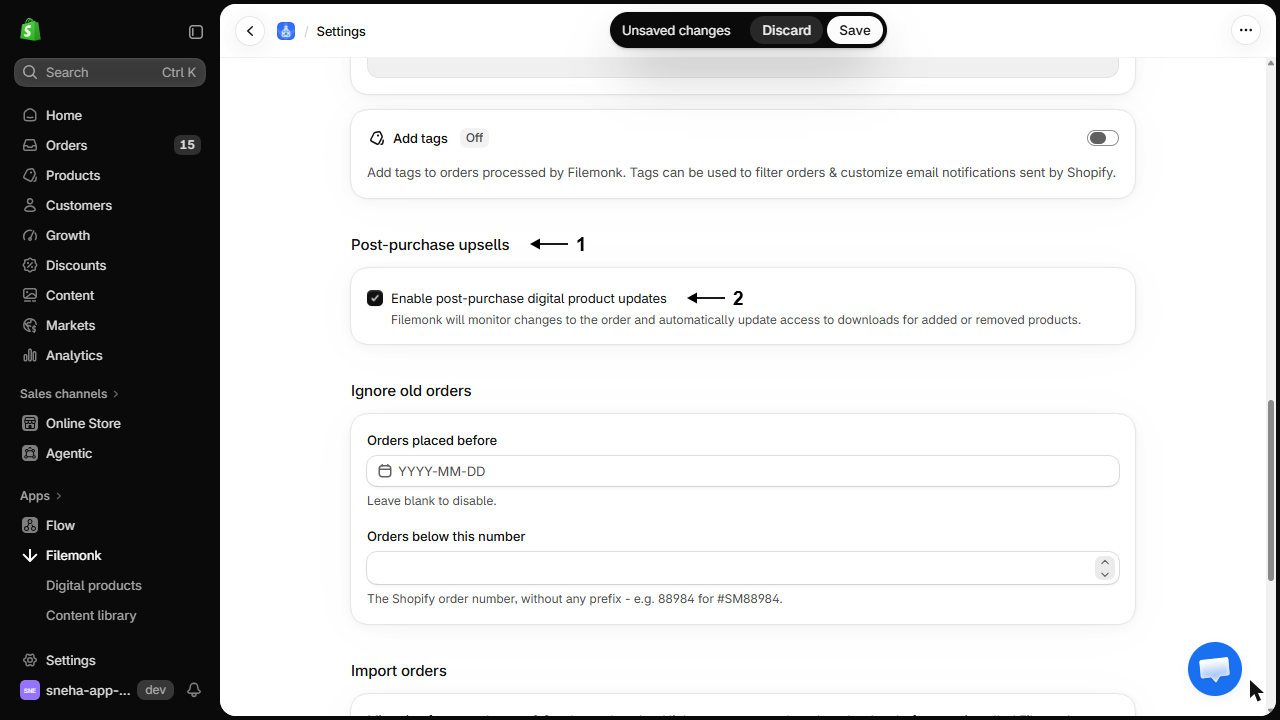
The upsold product also needs files linked in Filemonk, exactly like any other digital product. See Create a digital product.
What customers will see
Section titled “What customers will see”The upsold files arrive along with the rest of the order. Depending on timing, the customer may get a second email covering the added product.
Check your setup
Section titled “Check your setup”Place a test order, accept the post-purchase offer, and confirm the upsold product’s files appear on the order in Filemonk and reach the customer. See Create a test order.
Troubleshooting
Section titled “Troubleshooting”The upsold product's files never arrive
Check in order:
- The setting is on.
- The upsold product has files linked in Filemonk.
- The order in Filemonk actually lists the upsold product. If not, re-sync it. See Troubleshoot a single order.
The customer got two emails
The original order delivered first, then the upsell was added. That is normal. A single email is only possible if the upsell happens before Filemonk processes the order.
The order shows the upsold product but no files for it
Files were linked to that product after the order came in. Link them, then re-sync the order.
I don't run upsells but turned it on anyway
Turn it off. It adds no benefit and makes Filemonk re-check orders unnecessarily.
Does it work with any upsell app?
It responds to the order changing after checkout, which is how post-purchase offers work in Shopify, rather than to a specific app.
Does the upsold product count towards my plan?
It is part of the same order, so it does not count as a second order.
What about pre-purchase upsells and bundles?
Those are in the cart before checkout, so they are part of the order from the start and need no special setting.
Can I stop the second email?
Not while still delivering the files automatically. Turn off automatic sending and email from the order by hand if a single message matters. See Send emails with links for orders.
Related guides
Section titled “Related guides”- Create a digital product, so the upsold product has files.
- Troubleshoot a single order, when an upsell does not deliver.
- Manage your digital orders, to check what an order contains.
Thanks for letting us know.
Still stuck? Ask Quinn or chat with support