Ask for EU right of withdrawal consent
Have EU customers waive their 14-day cancellation right before they download.
Last updated
EU consumers have a 14-day right to withdraw from a purchase. For digital content that right ends once the download begins, but only if the customer expressly agreed to it. Filemonk can ask for that agreement on the download page and record it against the order.
This article describes what the setting does. It is not legal advice: your obligations depend on where you and your customers are, so check with someone qualified before relying on it.
Before you begin
Section titled “Before you begin”- The consent gate is a paid feature. On the Start plan the switch is greyed out, with an upgrade button beside it. See Filemonk pricing and plans.
- Filemonk asks for consent before downloading during the 14-day window. After that period, downloads are allowed even where no consent was recorded.
- Consent is recorded per order, with the date, and shown in your Orders list.
Set it up
Section titled “Set it up”-
Click Filemonk in the left menu of your Shopify admin.
-
Click Settings in the app’s menu, then open the Orders tab.
-
In Order settings, switch on Require consent before download (EU). The badge beside it changes from Off to On, and the fields below appear.
-
Under Require consent from, choose who sees the gate:
- EU customers only, which applies it to EU billing countries.
- All customers, which runs the same consent flow for every buyer regardless of country.
-
Write the Consent text the customer agrees to. The default reads: “I request immediate access to this digital content and acknowledge that I lose my right of withdrawal once the download begins.” You can use HTML, for example a link to your terms or refund policy. Links work on the download page on your store, but the download popup in the customer account shows the text without them.
-
Set the Button text they click to confirm, which is the label on the button that unlocks the download. It starts as Confirm and download.
-
Click Save in the save bar at the top of the page.
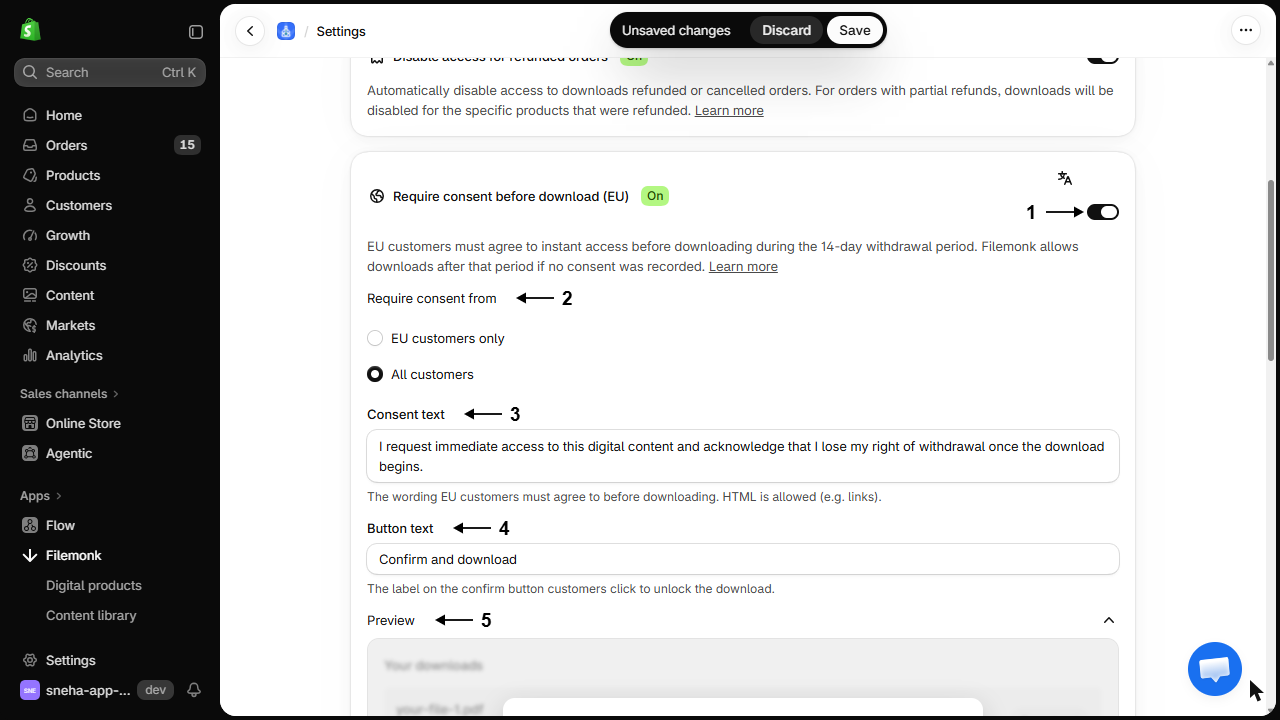
A Preview section below the fields shows the consent box as customers will see it, with your wording and button label.
Choose All customers if you would rather run one consent flow for the whole store than have EU and non-EU buyers see different things. It is the same wording and the same record either way.
If you sell in more than one language, translate the consent form as well, otherwise EU customers see it in your default language. See Translate the text customers see.
What customers will see
Section titled “What customers will see”A customer in scope, opening their download page or the download popup in their customer account during the 14-day window, sees your consent text with a checkbox and your confirm button. Ticking the box and clicking the button records the waiver and unlocks the download. No confirmation email is sent; the record lives on the order. Customers outside the window download as normal, as do customers outside the EU when the scope is set to EU customers only.
Check your setup
Section titled “Check your setup”Place a test order with an EU address and open its download page. You should see the consent step before the files. Confirm it, then check the order in your Orders list shows Consented with the date. See Create a test order.
Troubleshooting
Section titled “Troubleshooting”An order shows Awaiting consent and the customer is confused
They opened their download page, saw the consent step, and did not confirm. Explain that confirming is what unlocks the files, and that it is a legal acknowledgement rather than a marketing opt-in.
The consent step never appears
Check each in turn:
- The setting is on, and your plan includes it. It does not apply on the Start plan.
- The customer is in scope. With EU customers only, a non-EU billing country is not asked.
- The order is inside the 14-day window. After it, there is nothing to ask.
A non-EU customer was asked for consent
Either the scope is set to All customers, or the order has no recognisable billing country. Where the country is unknown, Filemonk asks for consent rather than skipping it, because missing a genuine EU buyer is the expensive mistake.
The consent text shows in the wrong language
It is separate from your other translations and has its own translator screen. See Translate the text customers see.
A customer downloaded and then asked for a refund anyway
The recorded consent is your evidence that they waived the withdrawal right. Open the order to see the date it was given. What you do about the request is your own policy decision.
Does this make my store compliant?
It gives you a mechanism to obtain and record consent, which is a piece of compliance rather than all of it. Your terms, refund policy, and disclosures matter too. Take proper advice.
Does it apply to customers outside the EU?
That is your choice. EU customers only limits it to EU billing countries; All customers applies it to everyone. One exception either way: an order with no recognisable billing country is asked for consent, since Filemonk errs towards gating rather than missing an EU buyer.
Where is consent recorded?
Against the order. Your Orders list shows Consented or Awaiting consent. Open the order to see the EU right of withdrawal section, with the date consent was given and the exact wording the customer agreed to.
Will it reduce my conversions?
It adds a click after purchase, not before, so it does not affect checkout. Some customers pause at it, which is the point.
What happens after the 14 days?
Downloads are allowed even where no consent was recorded, since the withdrawal period has passed.
Related guides
Section titled “Related guides”- Translate the text customers see, including the consent form.
- Manage your digital orders, where consent status appears.
- Customize the download page, for the page this sits on.
Thanks for letting us know.
Still stuck? Ask Quinn or chat with support