Disable access for refunded or cancelled orders
Cut off downloads automatically when you refund or cancel an order.
Last updated
A refunded customer keeping their downloads is a straightforward loss. Filemonk can turn access off automatically when an order is refunded or cancelled, including partial refunds, where only the refunded products lose access.
Before you begin
Section titled “Before you begin”- This needs a paid plan. On the Start plan the switch is greyed out, with an upgrade button beside it. See Filemonk pricing and plans.
- The rule catches orders refunded before you turned it on, but not straight away. Filemonk re-checks an order with Shopify the next time the customer tries to download, and whenever the order updates, so a past refund is picked up then rather than in a sweep when you save the setting.
- Refunding and cancelling in Shopify is what triggers it. Nothing happens if you refund outside Shopify.
Set it up
Section titled “Set it up”-
Click Filemonk in the left menu of your Shopify admin.
-
Click Settings in the app’s menu, then open the Orders tab.
-
In Order settings, switch on Disable access for refunded orders. The badge beside it changes from Off to On.
-
Click Save in the save bar at the top of the page.
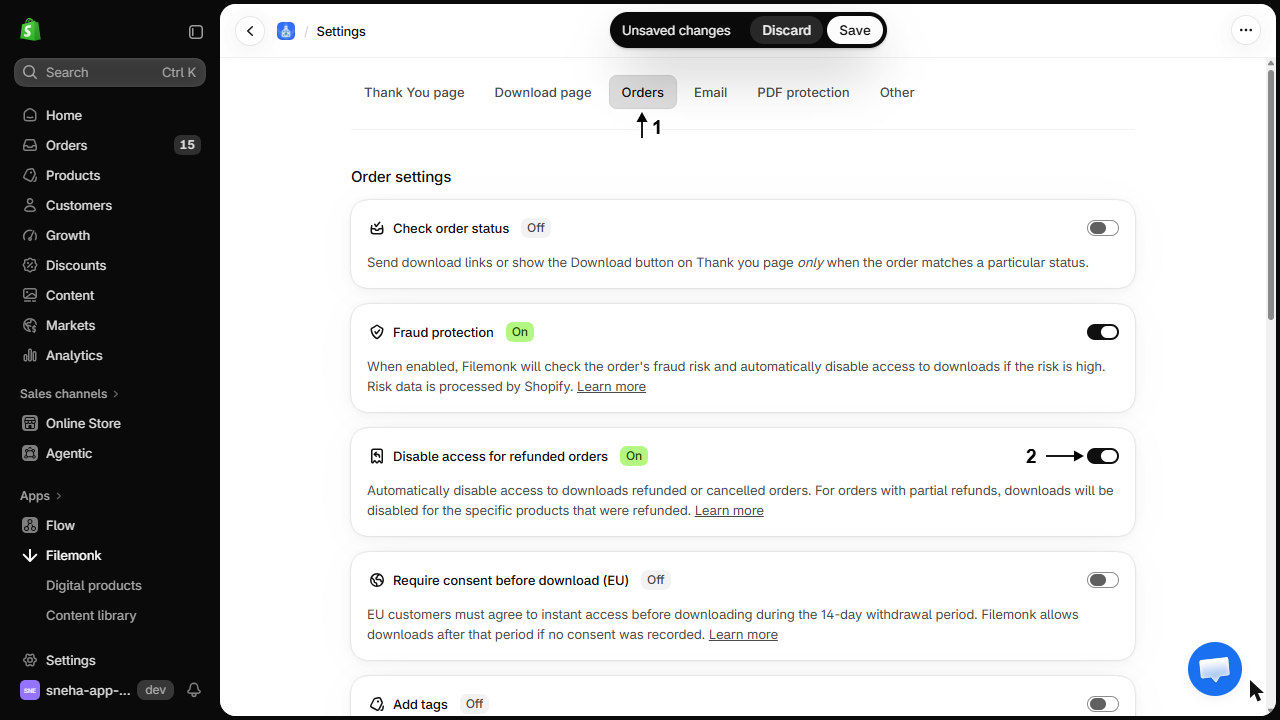
From now on, refunding or cancelling an order in Shopify disables its downloads. For a partial refund, only the refunded products are disabled and the rest keep working.
What customers will see
Section titled “What customers will see”The download stops working. Someone who already downloaded keeps the copy on their device, which is worth remembering before you treat this as a way to claw a file back.
Check your setup
Section titled “Check your setup”Place a test order, refund it in Shopify, then open the order in Filemonk. It should show Access disabled, or Partial access for a partial refund. See Create a test order.
Troubleshooting
Section titled “Troubleshooting”A refunded customer still has access
Either the rule was off when you refunded, or the refund happened outside Shopify. Disable that order by hand. See Disable access to downloads for any order.
The order shows Partial access and I meant to cut it all off
A partial refund only disables the refunded products. Disable the whole order by hand if that is what you intended.
I refunded by mistake and need to restore access
Re-enable the order, or the individual product, from the order itself. The rule does not fight you on it.
A customer downloaded before I refunded
Nothing can undo that. Disabling stops future downloads only. For repeat abuse, PDF watermarks make the leaked copy traceable. See Protect PDFs with a watermark.
Does this cover chargebacks?
A chargeback that results in a refund in Shopify triggers it. One handled entirely by your payment provider may not, so check those orders yourself.
What about cancelled orders that were never paid?
Cancelling triggers the same rule. An unpaid order may never have had access in the first place, depending on your status settings. See Send email and show the button based on order status.
Should I use this with high risk order protection?
Yes, they cover different moments: fraud protection acts on suspicion at checkout, this acts on a refund after the fact. See Disable access for high risk orders.
Can I disable access without refunding?
Yes, on any order, at any time. See Disable access to downloads for any order.
Related guides
Section titled “Related guides”- Disable access for high risk orders, for fraud rather than refunds.
- Disable access to downloads for any order, to do it by hand.
- How Filemonk protects your files, for how these fit together.
Thanks for letting us know.
Still stuck? Ask Quinn or chat with support